

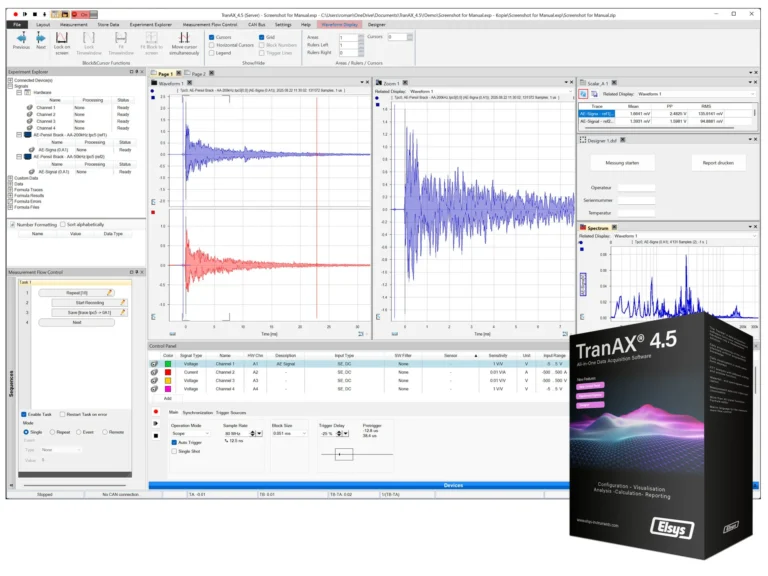
Last month Elsys released the latest version of its data acquisition software TranAX 4.5 with the tag line “Smarter and More Flexible”.
Highlights of TranAX 4.5 include the ability to create fully customized graphical user interfaces directly within TranAX , a new highly configurable control panel, and an explorer that enables the management of all signals, results, and data sources in one place. Switch seamlessly between hardware and file-based data for easy comparison.
Aerospace Testing International caught up with Roman Bertshci, Elsys AG’s CEO, to discuss the new software update.

How does TranAX 4.5 integrate with existing test workflows?
TranAX 4.5 delivers exceptional flexibility in how measurement tasks are designed and executed, enabling seamless integration into existing workflows and test environments. Automated process control and programmable measurement sequences help increase efficiency and reduce manual intervention. In addition, a wide range of interface options allows the software to communicate effortlessly with external systems, ensuring smooth integration into complex test infrastructures and digital toolchains.
What new features does TranAX 4.5 have and what are its main benefits?
The newly integrated Designer allows you to create custom user interfaces tailored to your workflow. Users can input key metadata, trigger actions, and display results directly, making repetitive measurement tasks simpler and more efficient.
The new Control Panel offers a more intuitive, application-focused approach to configuring measurement hardware. When working with sensors and transducers, the Equipment Database provides guidance to ensure correct sensitivities and keeps configurations up to date.
Additionally, measurement setups can now be prepared offline, without connected hardware, or reviewed during post-processing, enabling full flexibility for planning, validation, and analysis.
What are the computational performance improvements in TranAX 4.5 when processing high-speed data acquisition?
Since TranAX 3.0, even very long, high-sample-rate recordings can be displayed effortlessly. A continuously running data-reduction algorithm prepares measurement data in real time for visualization, enabling smooth playback and seamless zoom-in and zoom-out interactions for fast and responsive analysis.
Does the new Designer fumction support integration with existing LabVIEW or third-party protocols?
The Designer is built on its own robust framework, so third-party front-ends like LabVIEW cannot be imported. However, creating new custom dialogs is extremely straightforward, and existing interfaces can be quickly replicated, allowing teams to build intuitive, task-specific user experiences with minimal effort.
How does TranAX 4.5’s offline configuration capability benefit pre-test validation and certification documentation requirements?
The offline configuration capability of TranAX 4.5 allows complete test setups to be created, reviewed, and validated before hardware is connected, enabling thorough pre-test readiness checks. It supports configuration freeze and version control, ensuring traceability between test requirements, setup parameters, and measurement results. Additionally, it strengthens compliance and audit readiness by providing a documented, controlled, and repeatable test configuration baseline.
What specific aerospace testing scenarios benefit most from the Experiment Explorer’s unified data management approach?
While every measurement scenario is unique, the new Experiment Explorer particularly benefits workflows where raw data, calculated curves, derived values, and analysis reports are all used together. By managing all these elements in a single, unified location, it streamlines data handling, improves traceability, and makes post-processing and reporting far more efficient.